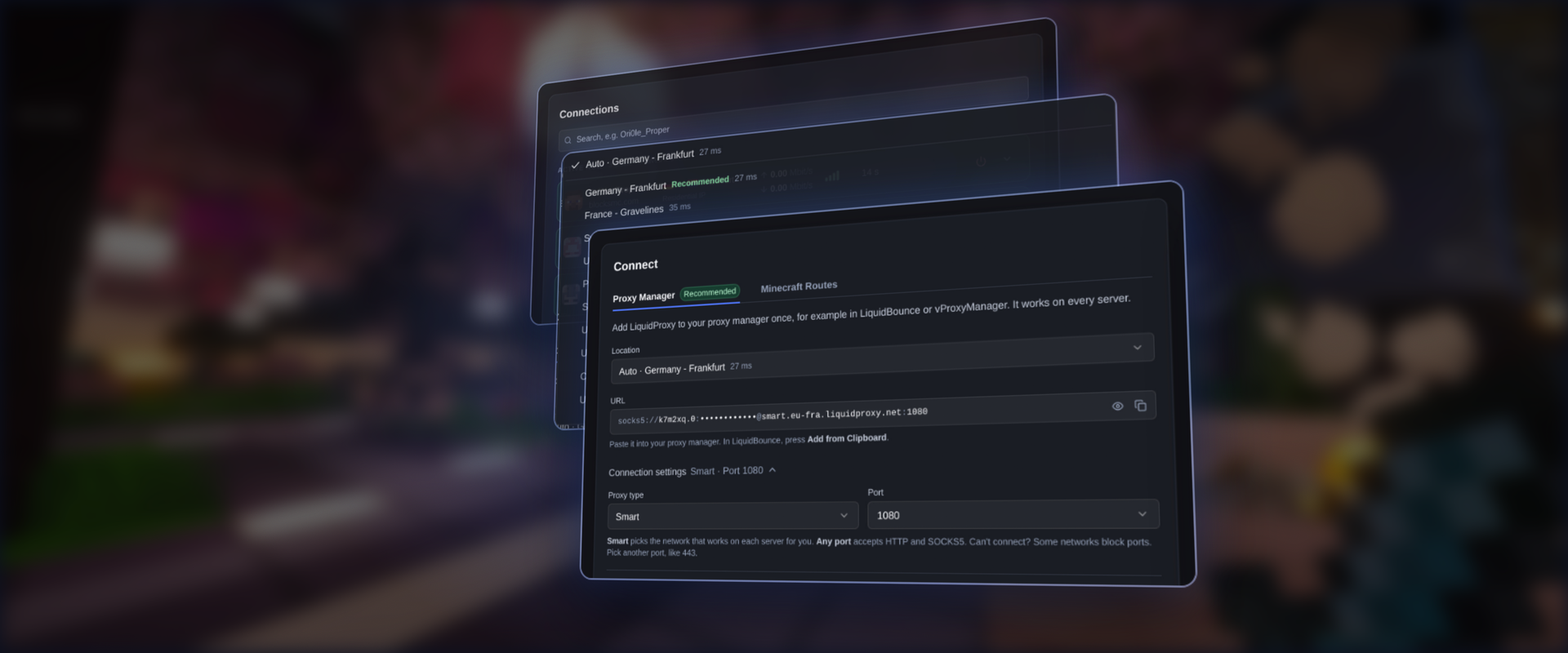
The dashboard on liquidproxy.net got rebuilt. Setting up LiquidProxy now takes one small card, joining a server through it got faster, and your connection history is now right on the page.
Quick reminder of what LiquidProxy does: it sends your Minecraft connection through one of our servers, so the Minecraft server sees one of our IP addresses instead of your own. We call that address the exit IP.
Faster Joins
Together with the new dashboard, we moved LiquidProxy to a new backend on October 15. The part you notice most: getting into a server through the proxy is now close to instant.
Shortly after the switch, the developer of the Icarus client told us their ping went down by about a quarter while playing on a mix of residential and mobile IPs, and that the game feels smoother too.
Translated:
Pseicco: "By the way, ping is somehow better too. I get about 20 to 30 ms less than I always used to with the proxy."
Izuna: "Maybe because of the better picking now. Mainly it was the auth improvement, it is basically instant now."
Pseicco: "Yeah, I already noticed. ... Feels smoother too, so nice job."
If you had trouble joining on October 15 or 16, that was us moving over. It should be fixed now. If it happens again, please tell us.
Connecting Got Simpler
The Connect card has two tabs.
Proxy Manager is the one we recommend. A proxy manager is the place in your client where you add proxies, and LiquidBounce has one built in. Copy the URL, then press Add from Clipboard in LiquidBounce. That's it, and it works on every server. You can also copy each part on its own if your client wants them separately.
Under Connection settings you pick two things:
- Proxy type: Smart, Dedicated or Residential. Smart picks the network that works on each server for you, so most people never need to change it.
- Port: every port accepts both HTTP and SOCKS5, the two common proxy types. If your school or work network blocks one port, pick another one, like 443.
The location list shows all 14 locations, each with a ping measured live from your browser. Frankfurt and Chicago are marked as recommended. Auto picks the location with the lowest ping. When a few are about equally fast, it prefers one in your country, then the closest one.
Minecraft Routes are for clients without a proxy manager. Add a route to your server list and join like normal. Each Minecraft account keeps its own IP. If a server says "Not authenticated with Minecraft.net", use the Proxy Manager instead.
Not sure how to set it up? The setup video walks you through both ways.
Your Connections, On the Page
Your session history used to open in a pop-up. It now sits right on the dashboard, and you can search it by player or by server. A few things are new:
- Games that are running right now show their current speed, plus signal bars for how good the IP is.
- The power button disconnects one game. It replaces the old "Kill All Connections" button.
- When a game ends, the account keeps its IP for a while, shown as "IP saved for ...". Want a fresh one next time? Press New IP on next join.
Open a connection to see more: the server the way it looks in your server list, the country and city of your exit IP, and what kind of IP it was. With the thumbs up and down buttons you can tell us how a session went, and why if it was bad.
One IP per Account
Every Minecraft account gets its own IP. While writing this post we played on three servers at once, each with a different account and a different kind of IP.
- Hosted IPs come from data centers. They are fast.
- Residential IPs look like a normal home internet connection, so they also work on servers that block VPNs.
- Mobile IPs come from mobile internet, the kind your phone uses which provide good quality and a ton of new IPs additionally. For example in Germany, many don't have a good fiber or cable connection, but rather slow DSL connection and use a mobile router at home instead. That means there are many players on mobile IPs, which means servers can't really block them without also blocking normal players who get their internet from a nearby 5G tower.
Your Usage
The Usage card replaces the old statistics. It shows your last 7 days: playtime, servers joined, Minecraft accounts and how many exit IPs you used, plus a chart of hours played per day.
Try It Out
Open your dashboard and join a server. You will also see a survey at the top. It is short and helps us a lot.
Found a problem or have an idea? Tell us on Discord.